
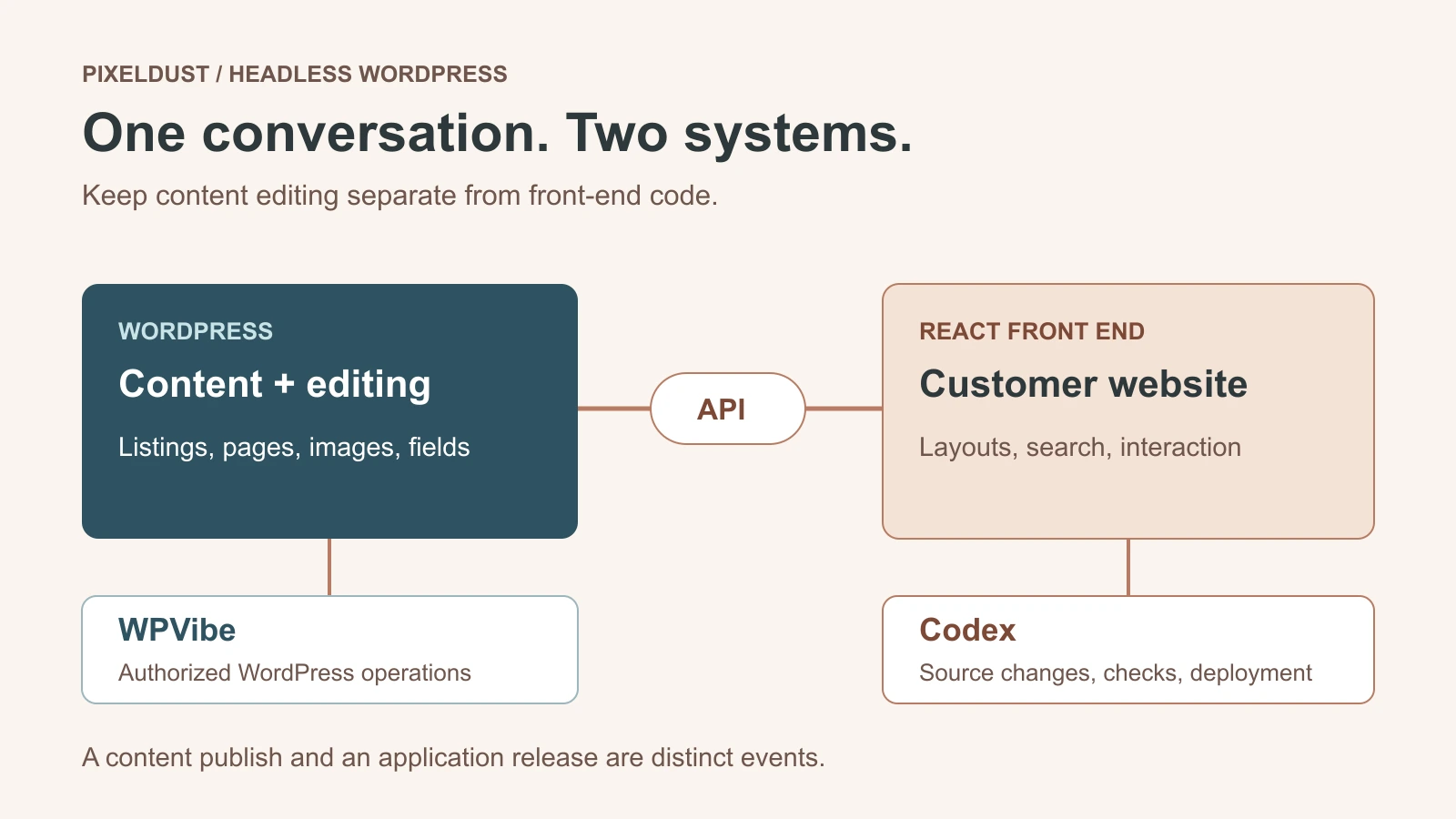
You can keep WordPress as the place your team manages content while building the public website in React. I consider that arrangement when the customer experience needs more freedom than the current theme provides, and the business wants to retain its familiar editing system.
The important decision comes before the technology: what should customers be able to do better? A separate front end introduces another application to build and maintain. I want a specific benefit worth owning that extra responsibility.
Headless WordPress means two connected parts
In a regular WordPress site, the theme helps turn stored content into the pages visitors see. In a headless setup, WordPress retains the content and editing tools, while another application handles the public presentation. For this guide, that application uses React.
The WordPress REST API handbook describes the built-in interface that lets applications exchange WordPress data. In plain language, the front end requests the information it needs and builds the customer-facing page around it. A custom connection still needs a defined content structure and appropriate access controls.
WordPress.com's headless overview explains the separation and its operating tradeoffs. Installing WPVibe does not automatically convert a theme into React. I would plan and build the new front end, then connect it to the content the business intends to publish.
A local property catalog gives the architecture a job
The Bryan–College Station Chamber's commercial real-estate directory establishes a local business segment where property information matters. Consider a hypothetical brokerage that already publishes listings in WordPress and wants clearer filtering and comparison. This is an architectural example, not a claim about a listed company's website.
I would ask what a visitor actually needs to compare: location, type of space, approved area measurements, availability status, and the right contact. Those fields need an owner and consistent meanings before a more sophisticated interface can help.
React could provide a tailored search and listing experience, while staff continue maintaining the underlying records in WordPress. But I would first check whether a suitable theme or supported plugin already solves the problem. A custom front end earns its place through the customer task, not simply through a newer stack.
WPVibe handles WordPress; Codex works on the front end
I use the tools for different parts of the same project. Through WPVibe, an authorized assistant can inspect and update WordPress content and supported site features. Its tools reference includes REST API access and theme work. Those capabilities are useful for the content side of a headless build.
Codex needs access to the React project's source and development environment to change that application's components, styles, routes, and data-fetching code. I can coordinate those tasks in a connected Codex conversation, with a clear record of which system each change touches. A WordPress connection alone does not grant access to a separate code repository or deployment account.
For example, “Change the contact wording on this property” may be a WordPress content edit through WPVibe. “Let visitors filter available office spaces by area” changes the React application and may also require new structured fields in WordPress. Editing a WordPress theme's header will not redesign a header rendered by the separate React application.
I define the content contract before generating pages
For the hypothetical brokerage, I would document each listing field, its allowed values, and what the public site does when it is missing. A blank availability field should not become Available because an assistant thought that made the design look complete.
I also inventory the existing blocks, shortcodes, forms, search, and SEO settings. A plugin that displays something inside a normal theme may not deliver the same experience to React. Each required feature needs a supported integration, a deliberate replacement, or a decision to leave it out.
Start with one representative listing and its inquiry path. That exposes the difficult details before generating a complete site: images, long descriptions, missing fields, accessibility, contact routing, and what happens when WordPress cannot answer the request.
Publishing needs an end-to-end path
A content editor should be able to preview an unpublished listing in the actual React layout. WordPress's normal preview is not automatically that experience. Frameworks offer mechanisms such as Next.js Draft Mode, but the project must connect preview access to the CMS and keep drafts away from ordinary visitors.
I then define how published content reaches the public site. Depending on the application, it may be fetched when requested, cached, or generated during a build. The owner needs to know the expected update delay and who investigates a failed refresh. Publishing a record in WordPress is not proof that an old public listing has disappeared.
For a public business website, I generally want useful page content delivered as HTML through an appropriate rendering strategy. React by itself does not guarantee speed or search visibility. I check actual titles, canonical URLs, redirects, structured data, sitemaps, images, and the pages a customer reaches from search.
Keep editing permissions and releases understandable
Public content reads and privileged editing are different operations. WordPress's authentication documentation describes the access mechanisms. I keep editing credentials out of browser-delivered code and check which fields the public API exposes. A preview should require the appropriate authorization.
I review front-end changes in a separate checkout, run the build and relevant checks, then inspect a preview before release. WordPress content publication and React deployment can be separate events. I name both, verify the live customer path, and plan recovery for the particular files or records changed.
The benefit must justify maintaining both sides
Ask a provider to demonstrate a content edit through WPVibe, a React layout change through Codex, an unpublished preview, and a failed content refresh. Ask who owns the source, hosting, backups, updates, and ongoing support. I would compare successful customer searches, useful inquiries, publishing effort, and maintenance cost against the existing site.
Pixeldust Interactive's website redesign service starts with the customer journey and the current site's limitations. For many College Station businesses, improving the existing theme is the better decision. For a genuinely custom experience, WordPress, React, WPVibe, and Codex can work together when their responsibilities are designed clearly.
If everyday edits are your immediate concern, start with my beginner guide to WordPress editing through chat. You can get that benefit without commissioning a headless rebuild.
Describe the customer task your current WordPress site makes difficult. I can help compare a focused theme improvement with a headless React build.