A resume upload button looks like a small website feature. I treat it as the entrance to a private document workflow. The applicant is handing over personal information, and your recruiter needs a useful application without inheriting a folder of uncontrolled attachments.
When I plan that feature, I follow the document beyond the progress bar. Where does it land? Who can open it? What happens if the connection drops or the file cannot be checked? Those answers matter more than the appearance of the upload control.
Begin with the application your recruiter actually needs
Workforce Solutions Brazos Valley publishes local career opportunities and connects job seekers with WorkInTexas.com. That is useful context for a region where applicants and employers already use online hiring channels. It does not establish how any private staffing firm's website handles documents.
For this hypothetical example, imagine an independent College Station recruiter accepting resumes for several employers. I would identify the vacancy, the responsible recruiter, and the minimum information needed for an initial conversation. I would not add identity documents, financial details, or unrelated certificates simply because the form supports more attachments.
First I would check whether the firm's existing applicant tracking system already provides a suitable hosted application page. A dependable handoff to that system may be the right answer. Custom development needs a reason beyond keeping every screen on the marketing website.
The destination is private from the beginning
I would keep resumes out of the website's public media library. A difficult-to-guess filename does not establish permission, and hiding a link from the page does not make the file private. The document needs a restricted storage destination and a controlled download path.
OWASP's authorization guidance distinguishes signing in from having permission for a particular resource. I apply that distinction to each resume request: the server checks whether this recruiter may access this application. Knowing an applicant's record number should not grant access to the attachment.
For the example firm, a recruiter assigned to one employer should not automatically see every other employer's candidates. I would test access using different staff accounts and a copied document address, including after an assignment changes. The important result is the server refusing an unauthorized request, not merely hiding a button.
A selected file still needs to earn acceptance
I would agree on a short list of necessary formats and a reasonable size limit, then show both before selection. PDF and DOCX may be appropriate for a resume workflow; the actual choices depend on the firm's tools. I would not accept archives or executable files for convenience.
The browser can help someone choose correctly, but it cannot enforce the rule. MDN explains that the file input's accept setting is a selection hint. I require server-side checks even if the file chooser appears to restrict the options.
OWASP's upload guidance recommends layered controls: inspect type and content, constrain size, generate storage names, and isolate stored files. I would use maintained validation and scanning components, with limits on total submissions and processing effort. A filename ending in PDF is not evidence that its contents are safe.
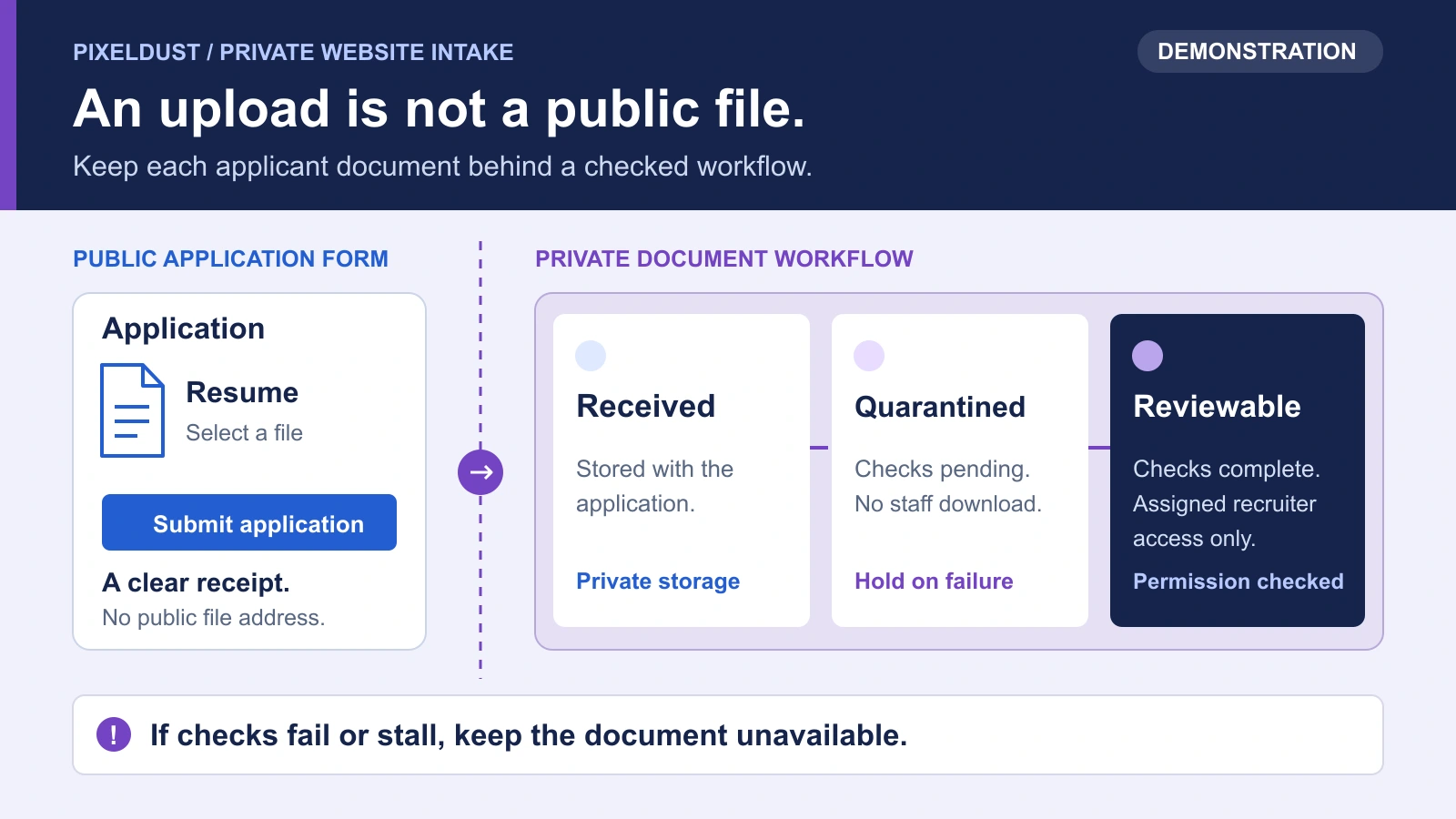
A malware scan is another layer, not a guarantee. I would also define what happens with damaged, encrypted, or unsupported documents. If checking cannot finish, the application should not quietly make the attachment available to staff anyway.
Received and ready for review mean different things
I would give the workflow explicit states. Received means the system has durably stored the submission. Quarantined means the attachment is waiting for checks and cannot be opened through the ordinary recruiter interface. Reviewable means the defined checks finished successfully. A rejected file needs a recovery path.
The applicant's confirmation should match the actual state. I might acknowledge receipt while explaining that a replacement will be requested if processing fails. I would not promise a completed application before the required file is stored, or imply that receipt guarantees consideration for a particular vacancy.
If there is a deadline, I ask the owner which timestamp governs acceptance and what staff should do when checking finishes later. On a slow mobile connection, progress feedback and an identifiable submission reference reduce uncertainty. Retrying the same upload should not create multiple competing applications.
A convenient download still needs a boundary
Some storage systems support temporary signed download links. Amazon S3 documents that these links grant access to whoever possesses them. Expiration limits the window; it does not make the link specific to one person or automatically single-use.
I would generate such a link only after the application's permission check, use a short appropriate lifetime, and avoid placing it in public pages or notification emails. If the business needs access checked for every download request, I would consider serving the file through its authenticated application instead.
My preference is a notification containing a link to the protected application record. I would not distribute resume copies through a long email chain and then describe the original storage controls as protection for all those copies.
Agree on ownership before accepting the first real resume
Someone must own stalled checks, failed notifications, replacement requests, and retention. I ask the hiring team to approve what is collected, how long it is retained, who can request deletion, and how copies in backups or exports are handled. I would not invent a universal retention period for every employer.
Before launch, I want a normal upload, an oversized document, a rejected format, an interrupted transfer, a scanner outage, and an unauthorized download tested with synthetic applicant information. Success means the right recruiter can review the right document and the applicant can recover when something goes wrong.
Pixeldust Interactive's custom software development service can connect a website application path to the firm's actual operating process. I would still recommend the hosted applicant system if it meets the need with less maintenance. No AI is required to make this workflow useful.
If your College Station or Bryan business needs document intake, tell me what applicants submit and who should be allowed to review it. I would begin with that boundary before adding an upload button.